
E-MAIL How To’s:
Access e-mail from any browser (edge, chrome, etc.) from anywhere in the world! – simply open up any browser and navigate to https://office.com and logon with your computer account credentials.
Mobile Device or Phone E-Mail settings:
Type = Microsoft 365 or Exchange
Use your work e-mail address (f.last@speck-pumps.com).
Password = The same as you use to log on to your computer
How to add a public folder to your outlook web access view:
After logging into your outlook on the web (office.com – then choose Outlook on the left side).
Once outlook is opened – on the left-hand side, right click on folders and then select “Add public folders to Favorites”.
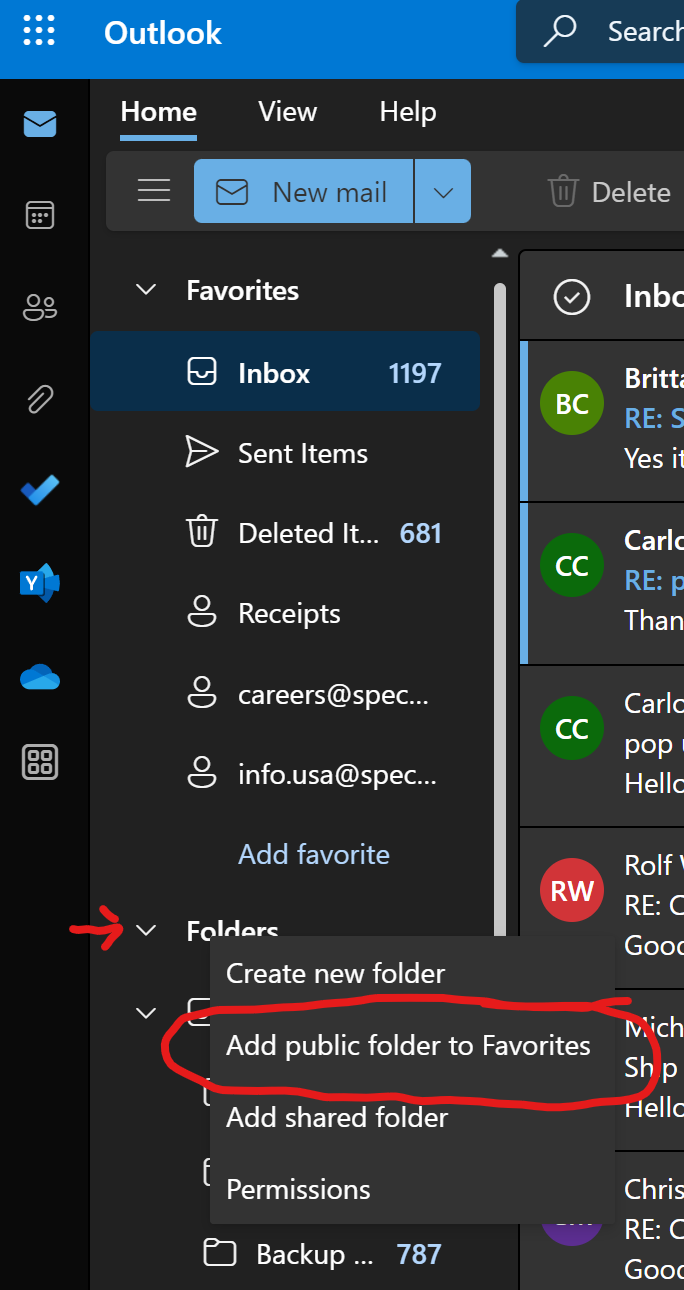
After making that selection you will be given a list of the public folders you have access to. Select the one you want to add. Repeat the steps to add multiple folders.
Out of office replies are useful, and a properly written one is a MUST. Click here to see the approved example of a proper out of office reply.
Share your calendar with people inside our organization:
-
- Open your Calendar.
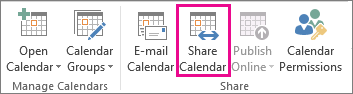
- Click Home > Share Calendar.
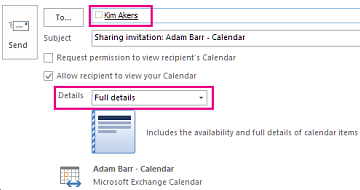
- In the email that opens, type the name of the person in our organization that you want to share your calendar with in the To box. In Details, specify the level of details that you want to share with the person in our organization, and then click Send.
- The person in our organization receives the sharing invitation in email, and then clicks Open this calendar.
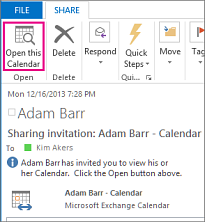
The shared calendar displays in the person’s Calendar list.
To view the conference room calendar in Outlook: Open your Calendar, then on the FOLDER tab click Open Calendar, then select “From Room List”, select the rooms you want to open, and click “Rooms” on the lower left-hand side to add them to the list, then click OK. The room calendars will then appear under “Rooms” on the left-hand side of your Outlook.
SYSPRO How To’s:
How to set screen/page/printing defaults: Click here
How to find a component Serial Number tied to a Parent: Click here.